Stop guessing. Measure every conversation.
Granular WhatsApp analytics for campaigns, chatbots and agents, from delivered and read rates to first response time and the revenue each broadcast brought in.
- No credit card needed
- Setup in 5 mins
- Official WhatsApp API
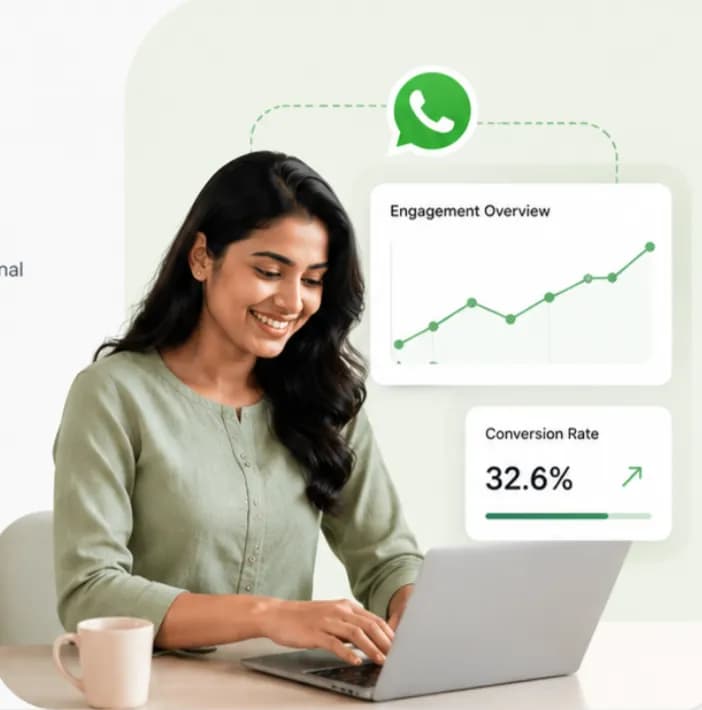
Why businesses choose Chatbox AI for
WhatsApp Analytics
Data-driven decisions
See which messages, templates and segments work, and put your budget behind them.
Agent accountability
Track each agent's response and resolution times to spot bottlenecks and coach the team.
Prove ROI
Attribute revenue to campaigns and automations to show exactly what WhatsApp earns.
- Delivery and read receipts
- Real-time
- Report types: campaign, agent, tag
- 3
Powerful capabilities
to scale on WhatsApp
Everything you need to automate conversations and drive conversions.
The full funnel, live
Campaign performance
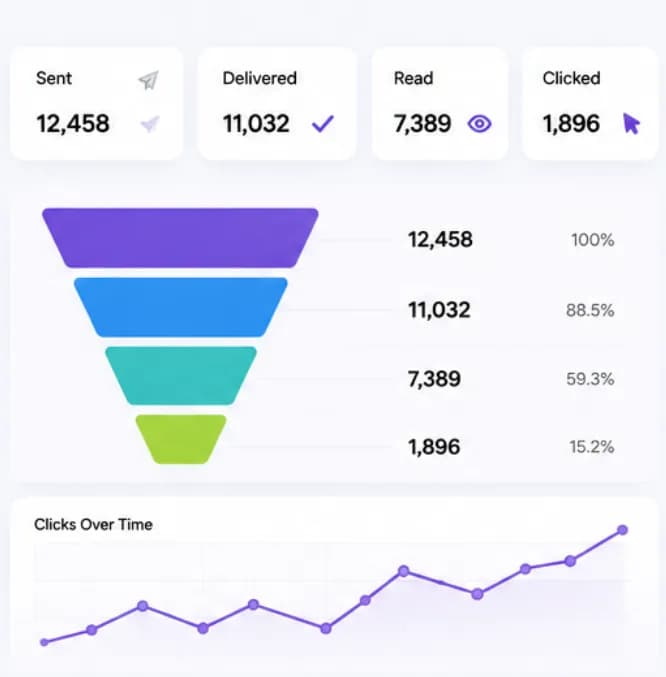
Get a complete view of every broadcast: sent, delivered, read and clicked in near real time. Compare template copy and segments to learn what drives the highest click-through rate.
- Delivered, read, clicked and replied
- Compare templates and audiences
- Near real-time updates
Hit your SLAs
Agent productivity reports
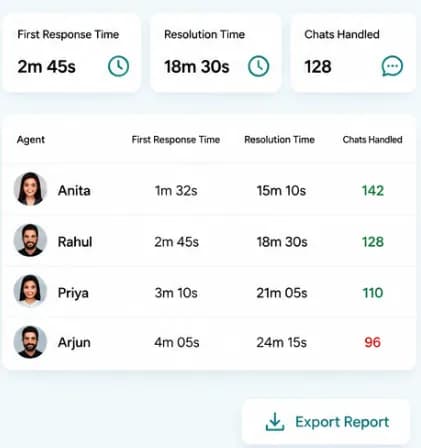
Monitor first response time, resolution time and chats handled per agent and team. Use the reports in weekly reviews and reward your top performers.
- First response and resolution time
- Chats handled per agent and team
- Peak-hour load to plan staffing
Spot trends early
Tag and label analytics
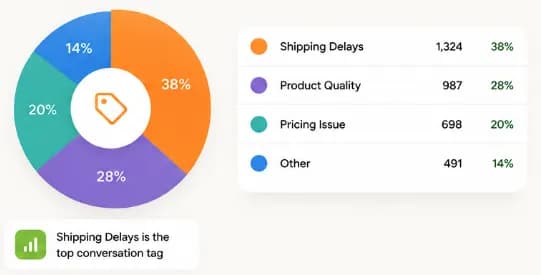
Analyse conversations by the tags agents and bots apply. Find out how many customers asked about 'shipping delay' versus 'product quality' last month and fix the root cause.
- Trends by tag, label and team
- Month-over-month comparisons
- CSV exports for BI tools (Pro and Scale)
How teams use
WhatsApp Analytics
Marketing managers
Analyse broadcast ROI and refine segmentation for the next campaign.
Support leads
Monitor agent SLAs and plan staffing for peak hours and sale days.
Founders
Get a bird's-eye view of customer satisfaction and WhatsApp revenue impact.
Automation owners
See where chatbot flows drop off and which ones hand off to humans most.
Questions about
WhatsApp Analytics
Got questions about WhatsApp Analytics? We've got answers.
Yes. On the Pro and Scale plans, campaign, agent and conversation reports can be exported as CSV files for analysis in Excel, Google Sheets, Tableau or Power BI, alongside advanced dashboards. Starter and Growth include in-app delivery, read and performance reports.
Can I export WhatsApp analytics data? Yes. On the Pro and Scale plans, campaign, agent and conversation reports can be exported as CSV files for analysis in Excel, Google Sheets, Tableau or Power BI, alongside advanced dashboards. Starter and Growth include in-app delivery, read and performance reports.
How real-time is the data? Campaign delivery and read receipts update in near real time, usually within seconds of WhatsApp reporting them, so you can watch a broadcast perform as it goes out.
Can I track revenue from WhatsApp campaigns? Yes, as long as something tells us about the order. With the WooCommerce or Shopify plugin connected, or by passing order events through the API, Chatbox AI attributes orders to the campaign or automation that drove them. Revenue attribution is available on the Growth, Pro and Scale plans.
Which metrics matter most for WhatsApp marketing? Start with delivery rate, read rate, click-through rate on buttons, reply rate and revenue per campaign. For support, track first response time, resolution time and customer satisfaction. Chatbox AI reports all of these in one dashboard.
Does WhatsApp show who read my message? The WhatsApp Business API returns sent, delivered and read statuses for each message (read only if the customer has read receipts enabled). Chatbox AI aggregates those statuses into campaign-level and contact-level reports.
Keep exploring

Your next 10,000 customers are already on WhatsApp.
Broadcast, automate, sell and support on the official WhatsApp Cloud API. Go live in under 2 minutes.
- 7-day free trial
- No credit card
- Cancel anytime