A WhatsApp chatbot that answers 24/7.
Automate up to 80% of repetitive customer queries with a smart, drag-and-drop WhatsApp chatbot. No developers, no code, just flows your team can build and change in minutes.
- No credit card needed
- Setup in 5 mins
- Official WhatsApp API
Why businesses choose Chatbox AI for
No-Code AI Chatbot
24/7 availability
Never miss a lead or leave a customer waiting, even at 2 a.m. or on public holidays.
Lower support costs
Deflect repetitive questions like order status and timings so agents focus on complex, high-value chats.
Instant responses
Customers get an answer in seconds instead of minutes, lifting satisfaction and conversion.
- Always-on replies
- 24/7
- Lines of code needed
- 0
Powerful capabilities
to scale on WhatsApp
Everything you need to automate conversations and drive conversions.
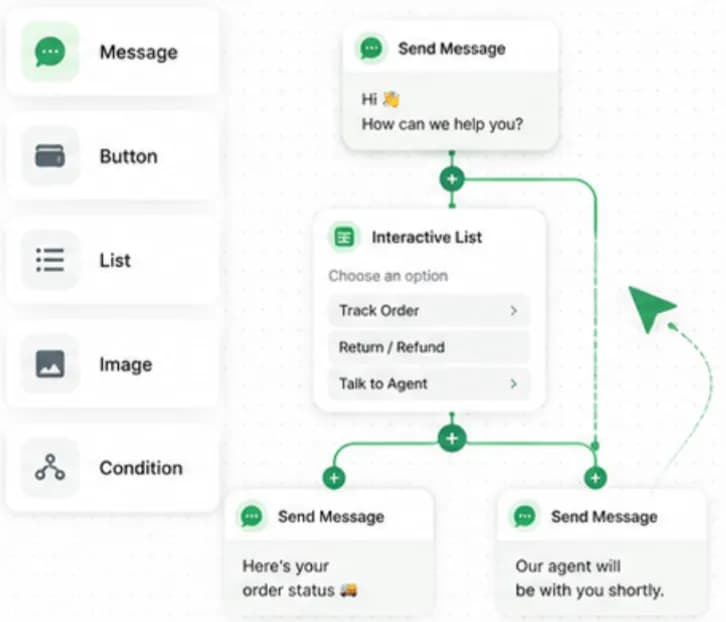
Drag, drop, publish
Visual flow builder
Map the entire customer journey on a visual canvas. Add interactive buttons, list menus, images, PDFs, conditions and API calls to create a rich automated experience, then publish in one click.
- Buttons, list messages and media blocks
- Conditions, delays and variables
- Keyword-triggered chatflows on every plan
Understands intent, not just keywords
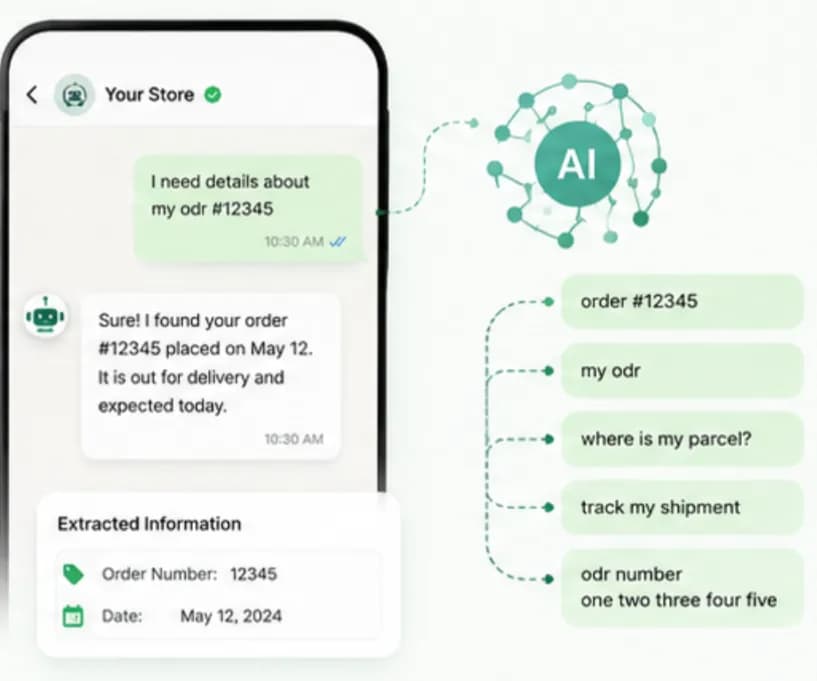
Natural-language AI
AI intent detection understands what a customer actually wants, even with typos, Hinglish or different phrasing, and extracts details such as order numbers, dates and cities to route them to the right flow. It also answers in the script the customer wrote in: Devanagari gets Devanagari, Hinglish in Latin letters gets Hinglish in Latin letters.
- Intent classification and entity extraction
- Replies in the customer's own script: English, Hinglish or Devanagari
- Fallback flows when confidence is low
Bot first, human when needed
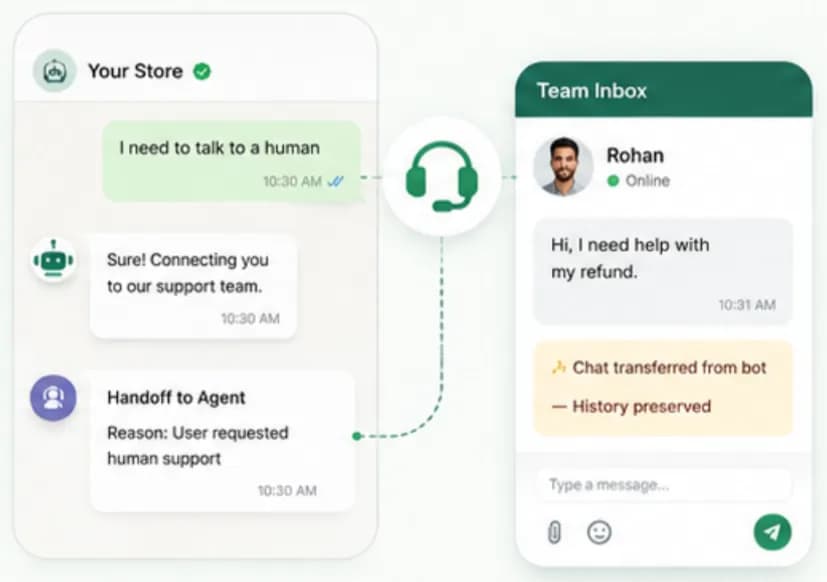
Seamless human handoff
When a customer asks for a person or the question gets complex, the bot transfers the conversation to the Team Inbox with the full transcript, so the agent never has to ask the customer to repeat themselves.
- 'Talk to an agent' keyword or button
- Assign to a team or specific agent
- Full chat history preserved
Set up No-Code AI Chatbot
in minutes
- 1
Pick a trigger
Start the bot on any incoming message, a keyword such as 'menu', or a Click-to-WhatsApp ad.
- 2
Design the flow
Drag in messages, buttons, list menus and conditions on the visual canvas.
- 3
Add AI and handoff
Enable intent detection for free-text questions and set when the bot should pass to an agent.
- 4
Test and publish
Preview the flow on your own phone, then publish it to your live WhatsApp number.
How teams use
No-Code AI Chatbot
Lead generation
Qualify leads with a few questions, budget, city, requirement, before routing to sales.
Order tracking
Let customers check order status instantly by sharing their order ID.
Appointment booking
Let users pick a slot from an interactive list and get an automatic confirmation.
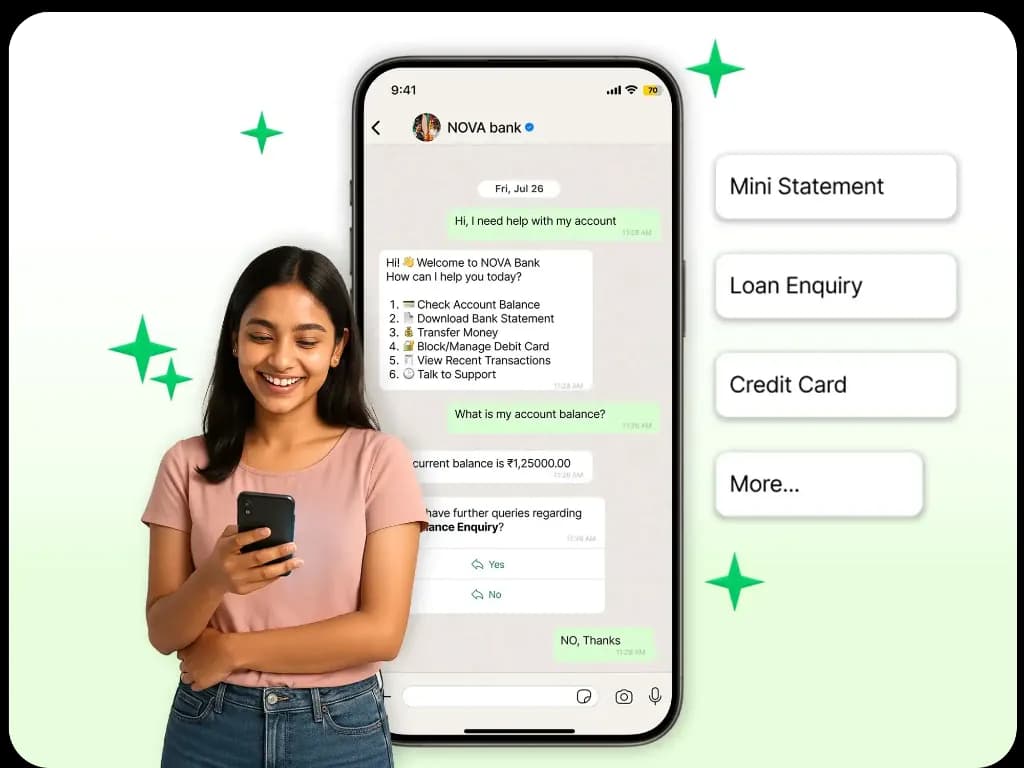
Banking self-service
Offer balance checks, statements and card blocking through a secure menu.
FAQ automation
Answer timings, pricing, return policy and store locations without an agent.
Guided shopping
Recommend products from your catalogue based on the customer's answers.
Questions about
No-Code AI Chatbot
Got questions about No-Code AI Chatbot? We've got answers.
No. Chatbox AI's visual builder is designed for marketers and support managers. You drag and drop messages, buttons and conditions, preview on your phone and publish, no coding experience required. Developers can optionally extend flows with API calls and webhooks.
Do I need a developer to build a WhatsApp chatbot? No. Chatbox AI's visual builder is designed for marketers and support managers. You drag and drop messages, buttons and conditions, preview on your phone and publish, no coding experience required. Developers can optionally extend flows with API calls and webhooks.
Can the chatbot connect to my CRM or store? Not with a pre-built connector: there is none. Using the Chatbox AI REST API and outbound webhooks you can push and pull data from your own CRM, for example to look up an order status or create a lead from the chat, but you write that part yourself.
What languages does the chatbot support? You write the flow's text yourself, so a flow can be in any language you can type. The AI assistant on top of it answers in the script the customer wrote in: Devanagari gets Devanagari, Hinglish in Latin letters gets Hinglish. There is no translation layer, so a flow written in English stays in English.
How many chatbot flows can I create? Keyword-triggered chatflows are included on every plan, and Growth adds chatflow delays and timeouts. The custom Scale plan adds custom integrations, a solution architect and a dedicated account manager.
Is a WhatsApp chatbot free? Incoming messages are free, and each WhatsApp Business number gets 1,000 free service messages a month, so bot replies to incoming questions add little or no Meta charge (₹0.145 per service message after the free allowance). Otherwise you pay your Chatbox AI plan, starting at ₹1,500/month after a 7-day free trial.
What happens if the bot can't answer a question? You define a fallback. The bot can rephrase the question, show a menu, or hand the chat to a human agent in the Team Inbox with the full transcript so the customer never repeats themselves.
Keep exploring
Your next 10,000 customers are already on WhatsApp.
Broadcast, automate, sell and support on the official WhatsApp Cloud API. Go live in under 2 minutes.
- 7-day free trial
- No credit card
- Cancel anytime